In Lesson 1, you studied relational database concepts and query languages and experimented with a few simple SQL queries. In this lesson, you will learn much more about SQL and practice more data retrievals from our sample database Sales. Particularly you will learn how to sort retrieved data with ORDER BY clauses and how to filter retrieved data with a variety of WHERE clauses.
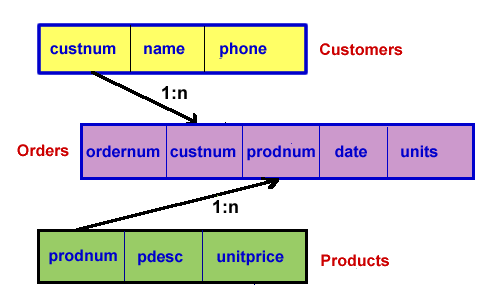
We repeat our example database design diagram here for your easy reference.
Here are links to the database contents if you need to check that: Customers, Products, Orders.
As you saw in the previous lesson, you can select one or more columns from a table in SQL. When displaying data or creating database reports, the ease of interpreting the given data can be greatly increased if the data is sorted. Sorted data is presented in some particular order. The columns on which we base the sorting are called sort keys. In SQL databases, you may select several sort keys to enable nested sorting. When several sort keys are specified, they are given in order of priority; the system will first sort the data by the highest-priority key, then all entries with the same value for that key will be sorted by the key with the next highest priority, and so on for additional sort keys.
To specify one or more columns as sort keys in SQL we use an ORDER clause. Here's an example. This SQL statement retrieves the names and phone numbers for all records in the table Customers and sorts the data by the column name.
SELECT name, phone FROM Customers ORDER BY name;
You can also sort by a column that doesn't actually appear in the output. The following SQL statement retrieves the names and phone numbers for all records in the table Customers and sorts the data by the column custnum, even though custnum data does not appear in the output.
SELECT name, phone FROM Customers ORDER BY custnum;
Here's a nested sort that would retrieve data from the Orders table, sorted first by customer number, then by date.
SELECT * FROM Orders ORDER BY custnum, date;
As you know, a semicolon specifies the end of a SQL statement. This means that you may break SQL statements across several lines if you like. For example, our last SQL query might be written as:
SELECT *
FROM Orders
ORDER BY custnum, date;
This multiple line format is actually preferred by many SQL users because it makes complex SQL queries much easier to read and interpret. We'll adopt it from here on. Here's an important note about ORDER BY clauses. These must be the last clause in a SELECT statement -- otherwise a SQL error is generated.
The default sort order in SQL is ascending (A to Z, 0 to 9, etc.). You can reverse this order if you like by including a DESC (for descending) keyword in your ORDER BY clause. The DESC keyword is associated with one or more particular sort keys and must follow the column name to which it applies. Here's an example (change in green) which repeats our last query, but sorts by latest date first.
SELECT *
FROM Orders
ORDER BY custnum, date
DESC;
In this activity you will again use MySQL to experiment with SQL queries on the Sales example database we defined earlier.
In our retrievals so far, we have retrieved all the rows (records) in a table for each query. Of course, we are often interested in only a portion of a table's data at one time. To make queries that retrieve only a portion of a table's rows, we apply a filter to the data. This is done using a WHERE clause in SQL. The WHERE clause is placed after the FROM clause and specifies a criterion (or multiple criteria, as you'll see a bit later) that the data to be retrieved must satisfy.
Here's an example of how we'd retrieve data for all orders placed by the customer with custnum 101.
SELECT *
FROM Orders
WHERE custnum = 101;
We should note that the column custnum has been declared to be an integer data type in our example. It might have been a text data type and if it had, the value 101 would need to be enclosed in single quotes in the comparison. No quotes are required for values that are integers or decimal numbers (including currency). It is imperative to know the data types of columns when we construct WHERE clauses making such comparisons.
Using WHERE clauses that compare dates requires the use of some built-in SQL functions. The date data type is a complex type with several parts. SQL provides functions such as MONTH(), DAY(), and YEAR() to extract the relevant parts of a date data type. Here's an example of how we'd retrieve data for all sales orders placed in June:
SELECT *
FROM Orders
WHERE MONTH(date) = 6;
Note the use of the SQL function MONTH() to extract the month (which is an integer) from the date column data.
In this activity you will again use MySQL to experiment with SQL queries on our Sales example database.